Appearance
Change Labware and Carriers
Place, replace or remove declared labware and change compatible carriers within the installed driver's capabilities.
Before you start
Confirm the target position and active configuration. Available models come from the driver. Site geometry, carrier footprints, modules and motion constraints can restrict changes. The workstation must satisfy the idle-state and resource conditions for applying a configuration.
With your AI agent
Inspect the labware and compatible models at this position. Prepare a replacement with the model I choose, and show the proposal and any affected bindings, well mappings or tip settings first.
The agent reads the active configuration and catalogue, then prepares a draft. After reviewing the impact, ask it to validate and apply that specific change and inspect the result. Preparing the draft does not change the active workstation.
For a carrier replacement, identify the carrier rather than a child item. Ask which existing objects can be retained and which associations need to change.
In the interface
Change labware: Select the target position in Workstation, inspect its contents and compatible choices, then choose a model or the empty option. Read the impact and save. This shortcut checks and applies the change through the backend; wait for a confirmed receipt before leaving.
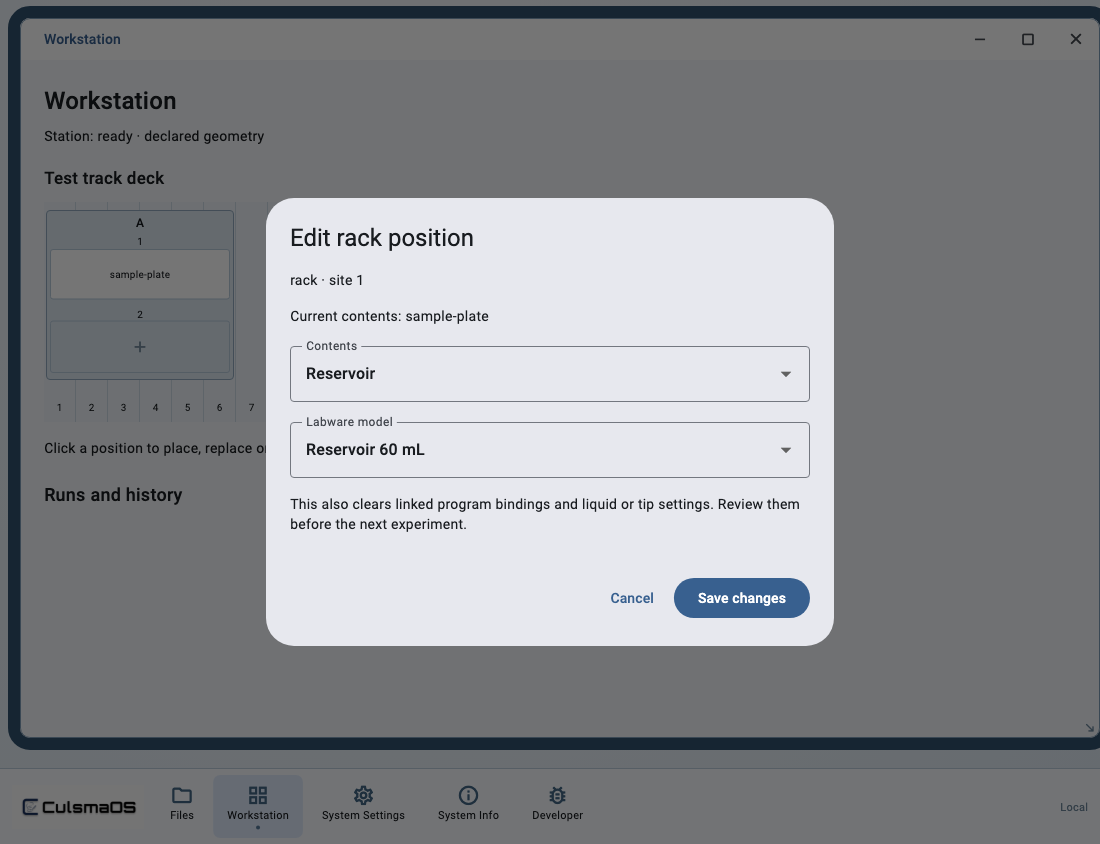
Change a carrier: Open System Settings → Racks and carriers. Select the target under Installed rack and choose Replace rack…. Choose a compatible model, review affected settings and complete the check and save flow.
If editing or compatible choices are unavailable, use the configuration path supported by that driver. An empty area on the diagram is not permission to place arbitrary labware.
Check the result
Read the active workstation layout again. Confirm the target position, model and required bindings. Replacement can clear settings that no longer apply. Missing tip sources or bindings must be configured explicitly rather than inferred from a name.
Editing records does not physically load containers or establish global reagent inventory. Physical preparation belongs to the experiment's loading flow. If a response is uncertain, check the original save request instead of creating a duplicate operation.