Appearance
Pause, Resume and Cancel
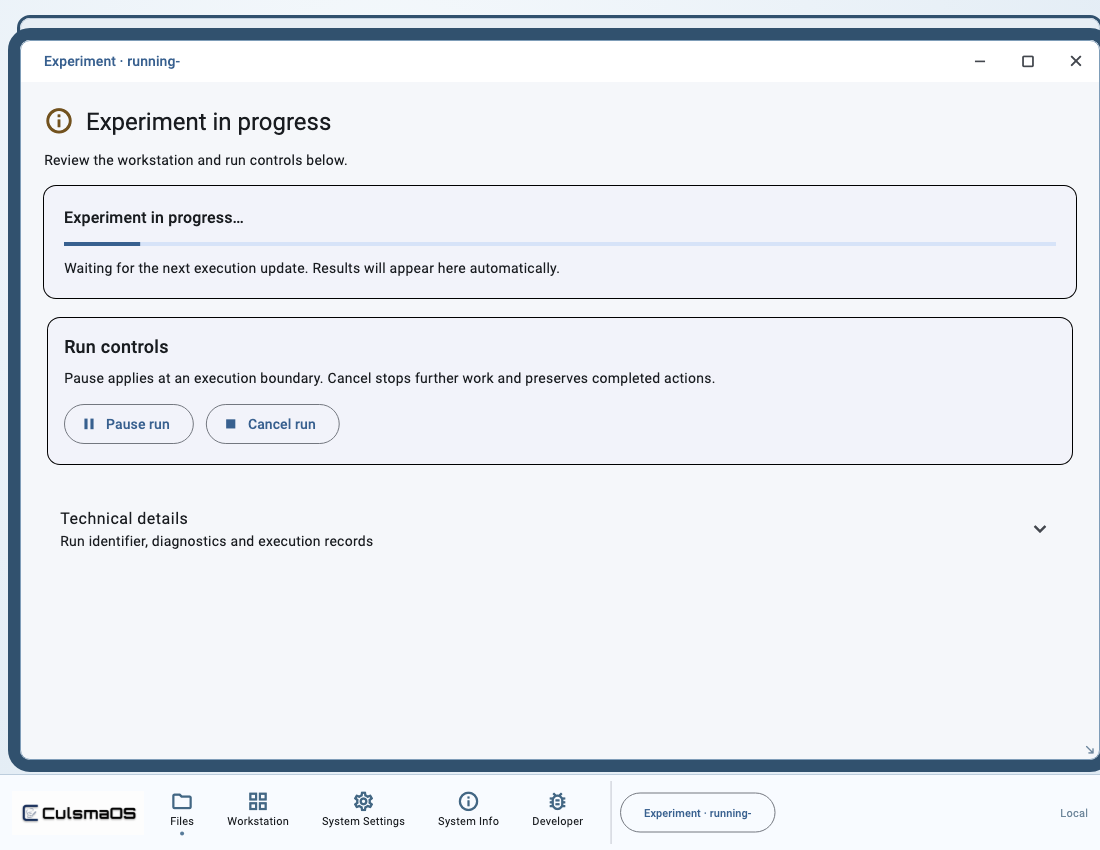
Control an existing run. Pause takes effect at supported execution boundaries; cancellation preserves actions and records that already occurred.
Before you start
Confirm the run identifier and current status. Pause and cancel are not hardware emergency stops and cannot undo completed physical actions.
With your AI agent
Pause this run and check whether the original control request has taken effect. Distinguish “request received” from “experiment paused.”
For resume, identify the same run. For cancellation, specify exactly which experiment should stop. The agent should read the current status, request only a supported action and then read the control receipt and run status.
In the interface
- Open Run controls for the target experiment.
- Select the available Pause run, Resume run or Cancel run action.
- Wait for its receipt. Use Check control status when needed.
- If a response is lost and retry is offered, use Retry same control request to preserve the original request identity.
Confirm the outcome
Check both the request receipt and run status. A disappearing button or an acknowledgement alone does not establish that the action took effect.
For needs_reconciliation, the current console cannot resolve execution uncertainty through an ordinary resume action. Preserve records and follow Experiment and Device Problems.